-

- Sopto Home
-

- Special Topic
-
- FTTH Knowledge
-
- How to Wire a Wall Network Port?

FTTH Knowledge
- Solving the FTTH Rollout Problem in Multiple Dwelling Units
- WDM PON Introduction FAQ
- A Simple Overview of Optical Power Meter
- ODN is based on PON FTTH Optical Cable Network of the Device
- Using an OTDR to be an Expert in Fiber Link Testing
- How FTTH Broadband Works?
- Connections among Fiber Terminal Boxes & Patch Cables & Pigtails
- Easy to Install a Fiber Terminal Box
- What is Arrayed Waveguide Grating?
SOPTO Special Topic
Certificate
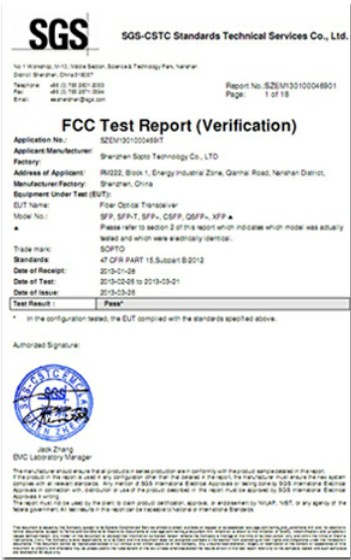

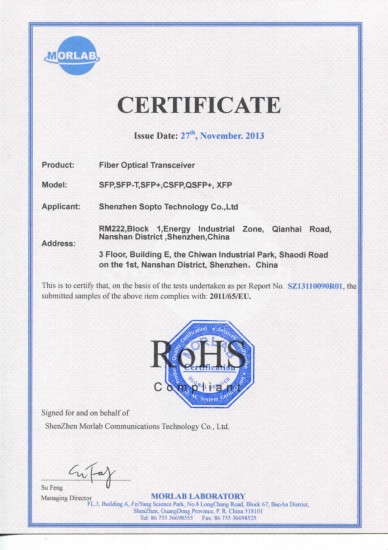
Guarantee
Except products belongs to Bargain Shop section, all products are warranted by SOPTO only to purchasers for resale or for use in business or original equipment manufacturer, against defects in workmanship or materials under normal use (consumables, normal tear and wear excluded) for one year after date of purchase from SOPTO, unless otherwise stated...
Return Policies
Defective products will be accepted for exchange, at our discretion, within 14 days from receipt. Buyer might be requested to return the defective products to SOPTO for verification or authorized service location, as SOPTO designated, shipping costs prepaid. .....
Applications

Sopto supply the best FTTH solutions for your network!
SNS Page


SOPTO Products
- Fiber Optic Transceiver Module
- High Speed Cable
- Fiber Optical Cable
- Fiber Optical Patch Cords
- Splitter CWDM DWDM
- PON Solution
- FTTH Box ODF Closure
- PCI-E Network Card
- Network Cables
- Fiber Optical Adapter
- Fiber Optical Attenuator
- Fiber Media Converter
- PDH Multiplexers
- Protocol Converter
- Digital Video Multiplexer
- Fiber Optical Tools
- Compatible
Related Products
Performance Feature
FTTH Knowledge
Recommended
How to Wire a Wall Network Port?
You may know how to make your own network cable, let's talk about how to hide it. Depending on your home, the actual job of running patch cables behind the wall or under the house, and making both of its ends come out of the wall, can be ticked. You might want to hire a handyman for that job, especially the part where you need to cut holes in the wall. You might want to hire a handyman for that job, especially the part where you need to cut holes in the wall. In this tutorial, I just teach you how you can make an Ethernet jack, with the ends of the patch cable already sticking out of the wall. And this is a CAT5e Network Cable, also known as a RJ-54 Ethernet jack.
A CAT6 jack has the same wiring, however, before you do these what tool do you need: a punch down tool. A punch down tool just cost your several dollars, and Ethernet jack and wall plate. You can buy these separately and you can find a wall pate that can house more than one jack. The Steps to Wire a Wall Network Port are as below:
First
Using the Fiber Cable Stripper to strip the patch cables about 2 inches from its end. You can strip more than 2 inches if needed, since the extra length will be cut off, but note that there's a limited amount of patch cable coming out of the wall so you don't want to cut it too short. Spread the eight wires from one another. There's no need to put them in a particular order since the pins on the Ethernet jack are color coded.
Second.
Placing the cable in the middle of the jack and push its wires on the pins of the matching color for the 568B standard. This means that the orange wire goes into the orange pin, the blue wire goes into the blue pin, and so on. Technically, you can use the 568A wiring standard, but in this case you'd need to do the same with the other end. Generally, you want to avoid using 568A for network ports because it could cause problems in the future if somebody else repairs the port and uses the more common 568B standard.
Third
Using the punch down tool to punch these wires down on their pin in one quick motion. If you do it right, the wire will be punched down, and the excessive wires will be cut off. Now you just need to install the wall plate and you are done with one network port. You can make another port at a different end of the house that connects to the port you have just made if you want to have just a single wired connection.
For purchasing high quality fiber optic network cables with low cost or for more products’ information, please contact a Sopto representative by calling 86-755-36946668, or by sending an email to info@sopto.com.